Superior Universal Remote for Samsung TVs
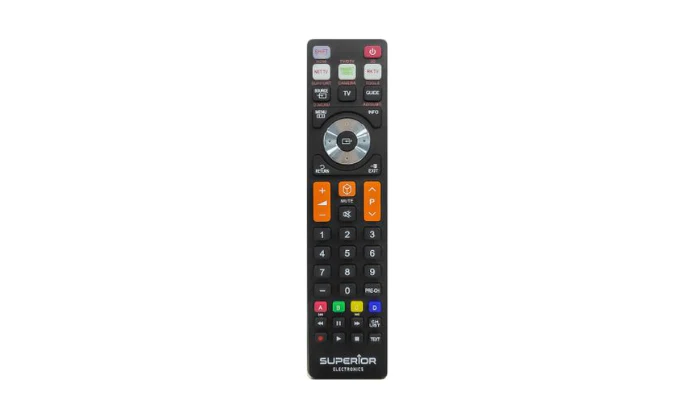
Control your Samsung TV with ease using the Superior Universal Remote, designed as a perfect replacement for all Samsung models. It’s user-friendly, reliable, and ready to use without programming.
Key Features- Fully compatible with all Samsung TVs
- No setup required – ready to use instantly
- Responsive infrared technology
- Lightweight, ergonomic design
- Durable and long-lasting buttons
| Compatibility | All Samsung TV Models |
| Setup | Pre-programmed |
| Power | 2 × AAA Batteries (not included) |
| Connection Type | Infrared |
| Color | Black |
- Insert batteries and point at your Samsung TV
- Press the power button — it works instantly
Superior convenience for Samsung users — control made simple.
Control your Samsung TV with ease using the Superior Universal Remote, designed as a perfect replacement for all Samsung models. It’s user-friendly, reliable, and ready to use without programming.
Key Features- Fully compatible with all Samsung TVs
- No setup required – ready to use instantly
- Responsive infrared technology
- Lightweight, ergonomic design
- Durable and long-lasting buttons
| Compatibility | All Samsung TV Models |
| Setup | Pre-programmed |
| Power | 2 × AAA Batteries (not included) |
| Connection Type | Infrared |
| Color | Black |
- Insert batteries and point at your Samsung TV
- Press the power button — it works instantly
Superior convenience for Samsung users — control made simple.
Description
Control your Samsung TV with ease using the Superior Universal Remote, designed as a perfect replacement for all Samsung models. It’s user-friendly, reliable, and ready to use without programming.
Key Features- Fully compatible with all Samsung TVs
- No setup required – ready to use instantly
- Responsive infrared technology
- Lightweight, ergonomic design
- Durable and long-lasting buttons
| Compatibility | All Samsung TV Models |
| Setup | Pre-programmed |
| Power | 2 × AAA Batteries (not included) |
| Connection Type | Infrared |
| Color | Black |
- Insert batteries and point at your Samsung TV
- Press the power button — it works instantly
Superior convenience for Samsung users — control made simple.